Sign in
What you see
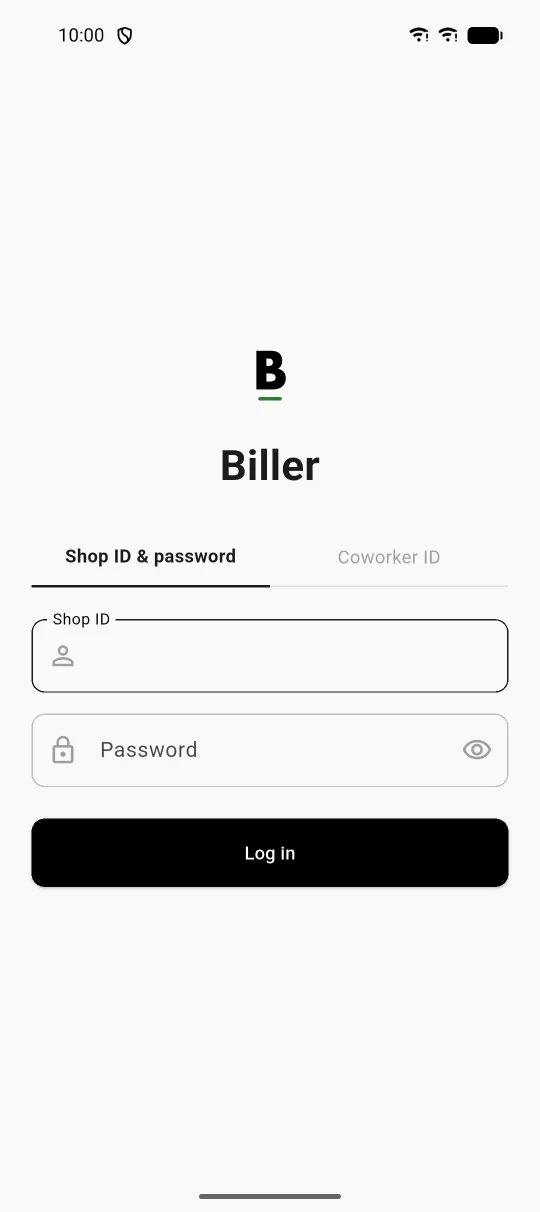
A plain light screen with the Biller mark, a B with a short green line under it, and the name Biller at the centre. Two tabs sit below: Shop ID & password, selected, and Coworker ID. The selected tab shows a Shop ID field with a person icon, a Password field with a lock icon and an eye control that shows the password, and a wide black Log in button.
What you can do
- Enter the shop ID and password issued to your shop, then press Log in.
- Use the eye control to show the password while typing, to avoid mistakes.
- On a second phone, switch to Coworker ID to join the master phone, as described in the two-phones steps.
Why it matters. Each shop ID keeps its own items and bills on the phone, and a coworker phone joins the master without a separate account.